
Why Is My iPhone's Duplicates Album Missing Similar Photos?
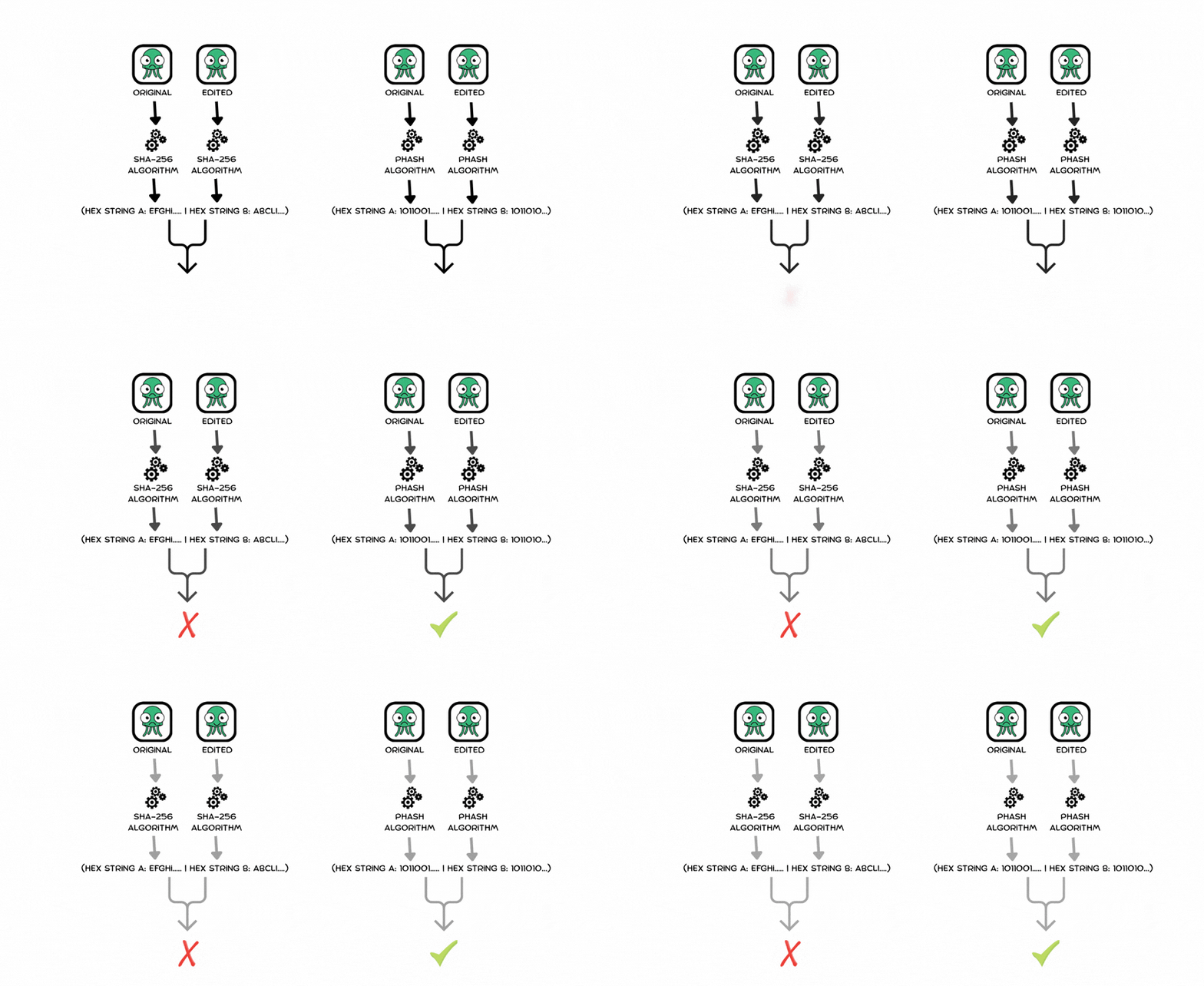
If you upgraded iOS expecting the native Duplicates utility folder to instantly fix your messy camera roll, you have likely run into a frustrating limitation.
The system catches identical file copies perfectly. However, it completely ignores the five near-identical burst shots you took of a moving subject, the slightly edited copy of a photo you shared, or a cropped screenshot. Your eyes tell you they are duplicates, so why is Apple blind to them?
The answer comes down to an intentional design limitation in how native mobile operating systems process image files.
1. The Strict Definition of a Duplicate
Apple's native duplicate detection is primarily engineered around exact or near-exact system matches.
When iOS scans your library in the background while your phone is charging, it looks for specific, strict markers:
- Identical Metadata: Assets sharing nearly exact timestamps, filenames, and capture locations.
- Byte-Level Properties: Direct file format twins or simple re-encodings (such as a raw
.HEICfile alongside a compressed.JPEGcounterpart of the exact same pixel matrix).
When you tap Merge, the system safely blends these direct clones together, preserving the highest quality version and combining tags into a single asset.
2. Why Similar Photos Break the Apple Pipeline
The native system explicitly fails on intentional visual variations, what software engineers categorize as Near-Duplicates.
When you take four photos in a row to ensure nobody blinks, or crop the border out of a landscape shot, the binary configuration of that file changes completely. To a computer checking raw metadata or direct pixel strings, a 48-megapixel original and a cropped square snippet look like completely unrelated pieces of data.
Apple strictly limits its detection sensitivity to prevent false positives. The system is intentionally conservative; it would rather leave 1,000 burst frames cluttering your device storage than risk an automated engine accidentally deleting an irreplaceable memory because the background geometry looked similar.
3. How Perceptual Hashing Catches What iOS Misses
To clear out visual clutter instead of just exact database duplicates, software has to look past file properties and analyze the actual layout, shapes, and structural signature of the image. This is exactly how independent tools like Purgley bridge the gap.
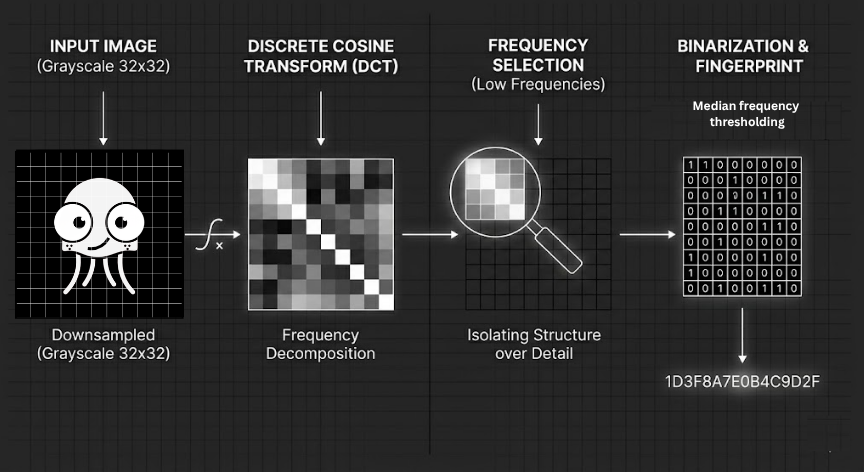
Instead of basic data matching, every photo runs through an optimized local Perceptual Hashing (pHash) pipeline:
- Downsample and Grayscale: The asset is scaled down to a minute grid (such as 32 X 32 pixels) and stripped of color variables.
- Discrete Cosine Transform (DCT): A mathematical formula decomposes the image into frequency blocks, isolating large structural layouts from fine noise.
- Binarization: The lowest 64 frequencies are compressed into a dense, unique 64-bit fingerprint.
If you shift your camera position slightly, change a facial expression, or crop the canvas, the core visual fingerprint remains virtually unchanged.
4. Engineering Clean Clutter Detection Responsibly
Processing thousands of complex visual fingerprints requires significant mobile computing power. Brute-forcing an image library can easily trigger severe thermal throttling or cause an Out-Of-Memory (OOM) crash on mobile hardware.
By skipping heavy cloud servers and utilizing hardware-level downsampling (CGImageSourceCreateThumbnailWithTransform), optimized utility engines can analyze image structures safely inside the local sandboxed chip environment.
The logic is simple: comparing these signatures takes mere nanoseconds using bitwise operations (nonzeroBitCount). This allows the device to cluster massive bursts and near-identical tracking shots together without sacrificing battery health or privacy.
Great storage cleanup should not require sending your private photo gallery to a third-party server. It just requires an engine that analyzes layout the way your eyes do.
Want to experience the speed of clean, local-first engineering? Download Purgley on the App Store and take control of your storage privacy today.