
Clustering 10,000 Images On-Device: How Perceptual Hashing Keeps Purgley 100% Private
Every digital camera roll is a graveyard of near-identical bursts, accidental screenshots, and slightly varied angles of the exact same sunset.
To fix this, most modern apps take the easy route: they upload your entire photo library to a cloud server, run heavy machine-learning models on their hardware, and catalog your life on a remote database. It works, but it costs you your privacy, uses massive amounts of data, and locks your memories behind a network connection.
When we built Purgley, we chose a different path: 100% on-device, local-only processing. To analyze and cluster thousands of photos on an iPhone without draining the battery or melting the processor, we couldn't rely on brute-force cloud computing. Instead, we turned to the elegant mechanics of Perceptual Hashing (pHash). Here is how it works under the hood.
The Core Problem: Why Cryptographic Hashes Fail
If you are a software engineer, your first instinct for finding duplicate files might be to calculate a cryptographic hash like MD5 or SHA-256.
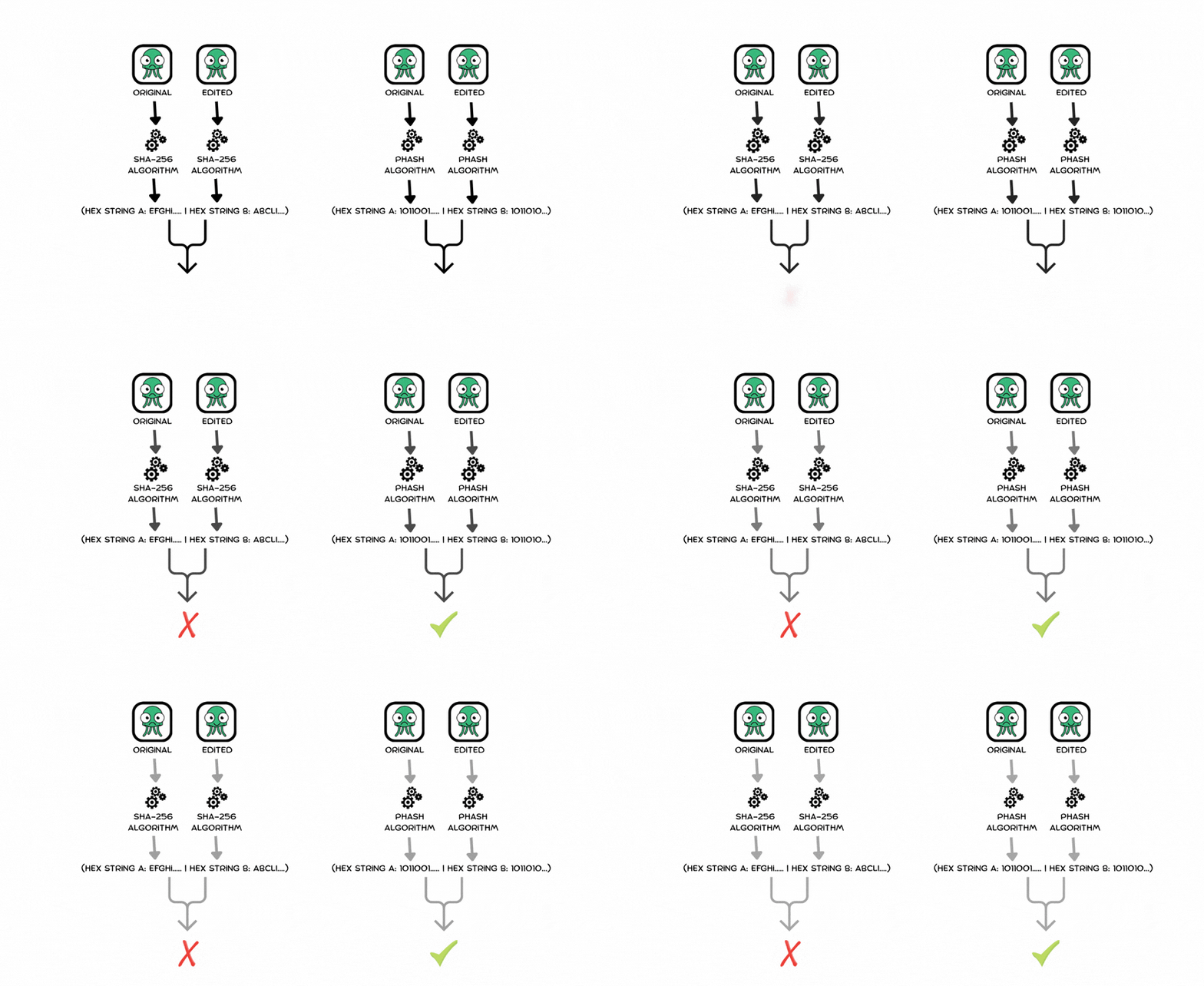
For files, this is perfect. But for images, it's completely useless. If you take a 48-megapixel photo, change exactly one pixel by a fraction of a shade, or compress it slightly, its SHA-256 hash will completely change.
Original Photo SHA-256:  e3b0c44298fc1c149afbf4c8996fb92427ae41e4649b934ca495991b7852b855
Slightly Edited SHA-256:  7f83b1657ff1fc53b92c48da1bf0714e7f58197cb0102928b1a20cdc3913045f
To group similar images together, we need a hashing algorithm that acts like the human eye—ignoring digital noise, slight exposure shifts, and minor compression artifacts while focusing entirely on the visual structure of the image. That is exactly what a Perceptual Hash does.
How pHash Extracts an Image's "Fingerprint"
Unlike cryptographic hashes, Perceptual Hashing generates a fingerprint where similar inputs produce similar hashes. The most robust variant, which Purgley leverages for deep visual analysis, relies on a mathematical concept called the Discrete Cosine Transform (DCT).
Here is the step-by-step pipeline executed entirely on your iPhone:
1. Downsample and Grayscale
First, we strip away the fluff. The image is scaled down to a tiny, standardized grid (typically 32 X 32 pixels) and converted to grayscale. This instantly eliminates high-frequency detail, color grading variables, and massive file sizes.
2. Compute the Discrete Cosine Transform (DCT)
The 32 X 32 pixel grid is transformed using a DCT. The DCT breaks the image down into a collection of frequencies. The top-left corner of the resulting matrix represents the lowest frequencies (the massive structural shapes and gradients), while the bottom-right represents high-frequency changes (edges, fine detail, noise).
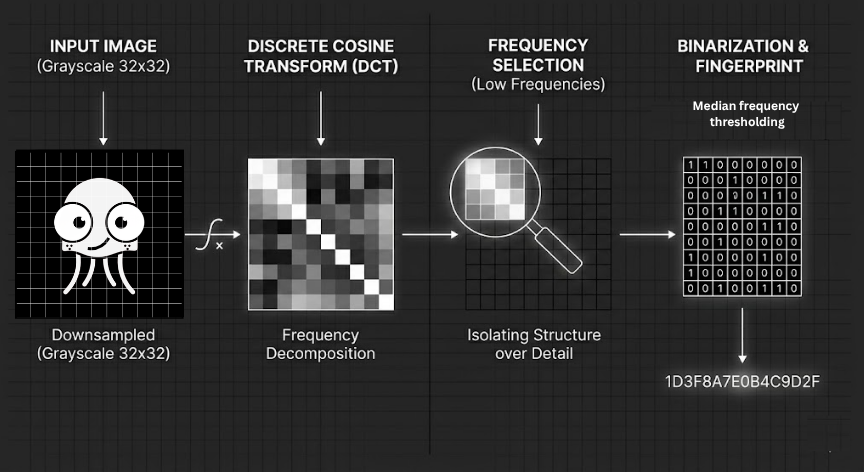
3. Isolate the Core Structure
Because humans perceive layout and large shapes rather than fine noise, we crop the matrix down to just the top-left 8 X 8 pixels. This gives us the 64 lowest frequencies of the image.
4. Binarize the Matrix
We calculate the median value of these 64 frequencies. Then, we look at each individual frequency: if it's above the median, it becomes a 1. If it's below, it becomes a 0.
The result? A single, highly dense 64-bit integer representing the core visual fingerprint of the photo.
Comparing 10,000 Photos in Microseconds
Once every photo has a 64-bit pHash, the real magic happens. We don't need to look at the photos ever again to know if they look alike; we just compare their integers using Hamming Distance.
The Hamming Distance is simply the number of bits that differ between two hashes. For example:
1100101011011010- Difference: 1 bit (highly identical photos).
On modern Apple Silicon, comparing two 64-bit integers doesn't require complex loops or heavy arrays. We can use a hardware-accelerated CPU instruction via Swift known as a population count (nonzeroBitCount).
/// Pure, hardware-accelerated similarity check
func calculateSimilarity(hashA: UInt64, hashB: UInt64) -> Bool {
    let distanceThreshold = 8 // Adjust based on how loose you want the cluster to be
    let hammingDistance = (hashA ^ hashB).nonzeroBitCount
    return hammingDistance < distanceThreshold
}
By executing an XOR bitwise operation (^) and counting the remaining bits, the iPhone can determine if two images match in a matter of nanoseconds.
Keeping It Lightweight: The Purgley Pipeline
Even with lightning-fast bitwise comparisons, comparing every single photo against every other single photo creates an O(N²) scaling bottleneck. If you have 20,000 photos, that's 400 million calculations.
To keep your phone from lagging, Purgley introduces structural optimizations:
- Time-Window Slicing: We leverage local metadata to sort your library chronologically. We only run dense pHash comparisons within localized time windows (e.g., photos taken within minutes of each other). You don't need to compare a photo taken today with a photo taken three years ago.
- Zero-Allocation Decoding: Loading a 48MP raw image into memory just to turn it into an 8 X 8 hash will trigger an Out-Of-Memory (OOM) crash. Purgley downsamples images directly at the hardware decode layer using Apple's Core Graphics framework, ensuring our memory footprint stays flat and negligible.
Craftsmanship Over Cloud
Building local-first software requires more discipline than spinning up an AWS instance, but the tradeoffs are entirely worth it. By pairing Perceptual Hashing with efficient bitwise logic, Purgley can cluster tens of thousands of media files in seconds.
Your data stays on your device, your battery stays healthy, and your camera roll gets clean—completely off the grid.
Want to experience the speed of clean, local engineering? Download Purgley on the App Store and take control of your storage privacy today.
Technical Glossary
- pHash (Perceptual Hash): A hashing algorithm designed to produce similar hashes for visually similar images, unlike cryptographic hashes which change completely with tiny variations.
- Discrete Cosine Transform (DCT): A mathematical transformation that breaks down an image into frequency components, separating low-frequency structural information from high-frequency noise.
- Hamming Distance: The number of positions at which corresponding bits differ between two binary strings; used here to measure image similarity.
- On-Device Processing: Computation performed locally on the user's device rather than on remote servers, preserving privacy and enabling offline functionality.
- Burst Detection: The automated identification of rapid sequences of photos taken in quick succession (typical of camera burst mode).